iPhone Not Charging? 15 Reasons & Easy Fixes You Can Try at Home (2026 Expert Guide)
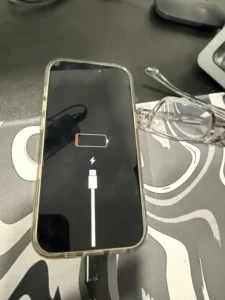
If your iPhone is not charging, don’t panic. This is one of the most common issues iPhone users face — and the good news is that majority of charging problems can be fixed at home without spending money.
This complete 2026 guide explains:
Why your iPhone suddenly stops charging
How to fix it at home
When it’s a hardware issue
When you must visit a repair center
How to prevent charging issues in the future
Let’s jump right in.
1. Dirty or Blocked Charging Port (Most Common Issue)
Your iPhone’s charging port collects dust, lint, microfiber from pockets, etc.
This stops the cable from fitting properly → iPhone won’t charge.
How to Fix:
Turn off your iPhone
Use a toothpick or SIM tool
Gently remove dust from the port
Insert lightning cable again
Do NOT use metal pins or water.
2. Faulty or Damaged Charging Cable
iPhone cables break internally very easily. Over 40% of “not charging” issues are cable-related.
How to Check:
Try charging with another cable
Try on a friend’s iPhone
If your iPhone charges with another cable → your cable is faulty.
3. Faulty Power Adapter
Your adapter might be burned out or delivering low voltage.
Fix:
Try:
Another adapter
Another socket
A 20W fast charger
4. Moisture Detected in Charging Port
If your iPhone shows “Liquid detected in the Lightning connector”, it will block charging.
What to Do:
Leave your iPhone unplugged for 30–60 mins
Keep in a cool dry area
Do NOT use hair dryers
5. Battery Health Too Low
If your battery health is below 70%, charging becomes unstable.
Symptoms:
Charges slowly
Charges only after restarting
Heats during charging
You need a battery replacement.
6. iOS Bug or Software Glitch
Sometimes, iOS crashes and prevents charging.
Fix:
Restart your iPhone
Update to latest iOS
Reset all settings (non-destructive)
7. Charging Port Hardware Damage
If your iPhone charges when you bend the cable → your port is loose.
Causes:
Frequent use of non-original cables
Pulling cable roughly
Damage from drops
Ports need professional microsoldering or replacement.
8. Debris Inside Lightning Connector of Cable
Sometimes the dirt is not in your phone, but in your cable’s connector.
Fix:
Clean the lightning connector using a soft brush.
9. Overheating Protection Mode
iPhones stop charging when they are too hot.
How to Fix:
Remove back case
Stop gaming / navigation
Let the phone cool
Place near a fan
10. Using Unsupported Fast Chargers
Very high wattage chargers (30W, 45W, 65W) can cause charging to stop or slow down.
Use Apple-recommended 20W charger.
11. Battery Calibration Error
Sometimes your iPhone thinks it is full even when it’s not.
Fix (Calibration):
Charge to 100%
Use until it turns off
Charge to 100% again
12. Internal Short Circuit
If your phone charges only when switched off → internal short.
Needs board-level repair.
13. Damaged Charging IC (U2 IC Issue)
If:
iPhone slowly charges
iPhone drains while charging
iPhone heats during charging
Then your Tristar IC (U2 IC) is weak.
Only a professional repair center can fix this.
14. Wireless Charging Issues
If your iPhone charges wirelessly but not with cable → port is damaged.
If not even wireless charging works → battery or motherboard issue.
15. Completely Dead iPhone (Shows No Sign of Life)
If your iPhone:
shows no battery logo
doesn’t turn on
doesn’t vibrate
doesn’t charge
It may be:
Dead battery
Blown charging IC
Faulty power circuit
Professional diagnosis required.
When Should You Visit a Repair Center? (Important)
Visit a repair shop if you notice:
Bent charging port
Phone charges only at specific angles
Error messages about liquid
Slow charging suddenly
Battery dropping fast
Phone stuck at Apple logo
Phone dead after overnight charging
These cannot be fixed at home.
How to Prevent Charging Problems (Pro Tips)
Avoid cheap cables
Clean your port monthly
Stop using phone while charging
Avoid using 30W/45W laptop chargers
Don’t charge in hot places
Replace battery once health drops below 75%
Professional iPhone Charging Port / Battery Repair
If nothing works, your iPhone likely has hardware damage that needs expert diagnosis.
For Bengaluru users, Atom Repairs provides:
Charging port repair
Battery replacement
Motherboard charging IC repair
Doorstep service
OEM parts
Affordable pricing
(Add your contact link here)
FAQ
1. Why did my iPhone suddenly stop charging?
Dust in port, faulty cable, or software crash are the most common reasons.
2. How do I know if my charging port is damaged?
If your phone charges only at specific angles, your port is loose.
3. Can water damage stop charging?
Yes. iPhones disable charging automatically if moisture is detected.
4. How do I fix slow charging?
Use a 20W charger, clean port, stop using phone during charging.
5. Can charging issues be repaired?
Yes. Port replacement, battery swap, or IC repair can fix all charging-related problems.
Need Your iPhone Fixed Quickly?
Still facing charging issues? Let the experts handle it.
Atom Repairs (Bengaluru) offers fast, affordable, and premium-quality repairs for all iPhone charging problems — including battery, charging port, and power IC issues.
👉 Book Your Repair Now 70090075750
More iPhone Repair Services You May Need
Fixing charging issues often goes hand-in-hand with other common iPhone repairs.
Explore our dedicated service pages: